

I Spent Today Letting Claude Code Build Whatever It Wanted
Dynamic workflows are the first feature that makes “go build the whole thing and tell me when it’s done” a real instruction. Here is what I learned getting the most out of them.


Last Saturday (Still today tho. :) ) I did something I would not do on a workday. I opened Claude Code, turned on the new dynamic workflows feature, and gave it a deliberately loose instruction: build a small SaaS with actual monetization wired in, pick the idea yourself, finish it. Then I made coffee and let it run.
I came back to a working app. Not a scaffold, not a README full of next steps. The idea it landed on was ForgeMCP, a no-code platform for building and hosting MCP servers: add tools that call your APIs, run AI prompts, or return templated data, then connect Claude or Cursor to a single secure URL. Free forever for one server. Landing page, sign-up flow, Stripe in test mode, a database schema, a deploy config. The thing ran.
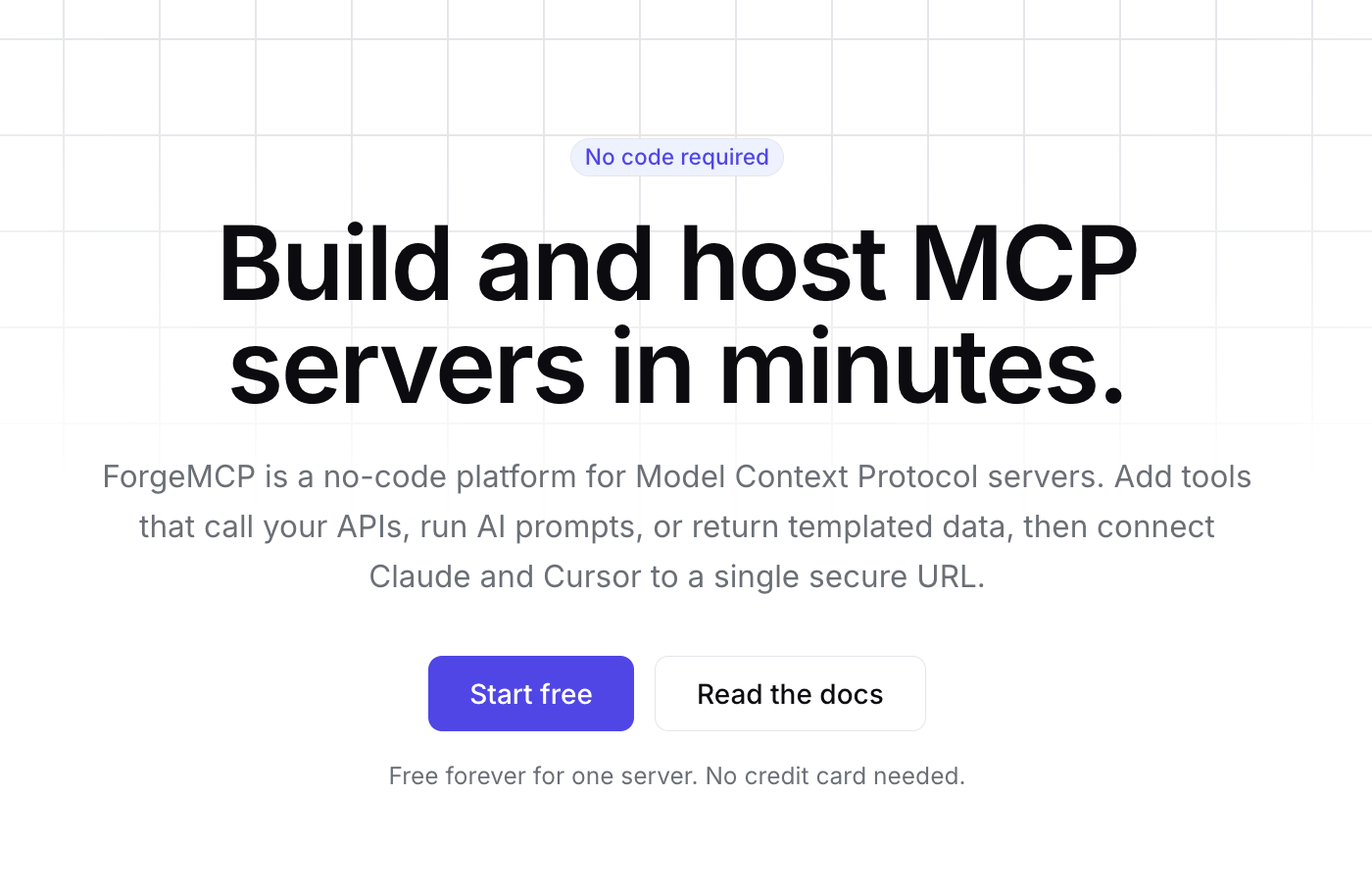
Some decisions were wrong, and the idea was not one I would have chosen myself, but the shape of a finished product was sitting there, built end to end while I was not watching. For a while now the rule with coding agents has been “do not walk away.” You paired, you watched, you corrected, you committed. Walking away for an hour got you a mess. It’s called Vibe Coding for a reason. Dynamic workflows are the first feature Anthropic has shipped that is designed for you to walk away on purpose, and the design is good enough that walking away is now the point.
This issue is about how to actually get the most out of that. Not the marketing version. The version where you understand what it is good at, what it wastes money on, and the specific habits that separate a Saturday that produces a working app from a Saturday that produces an expensive pile of half-finished agents.
Hit reply and tell me what you would point it at first. I am collecting the tasks people reach for, because the early list is going to tell us a lot about what this feature is really for.
Three things to hold onto:
A dynamic workflow is Claude writing a real orchestration script for your task, then running tens to hundreds of subagents against it in the background while your session stays free. The plan lives in code, not in the chat. Only the final answer comes back.
The feature rewards one skill above all others: specifying the bar. There is nobody in the loop to correct vagueness mid-run, so the quality of your “definition of done” is the quality of your result.
The biggest wins are tasks that split cleanly into parallel pieces and have an objective way to check each piece. Migrations, audits, bug sweeps, research. The biggest waste is pointing it at work that is sequential or taste-based.
What it actually is, in plain words
The official one-liner from the Claude Code team is accurate and worth keeping in your head: “Claude writes an orchestration script on the fly, then spins up a large fleet of coordinated subagents in parallel to take on your most complex tasks.” When you put the word “workflow” in your prompt, or turn on a setting called ultracode, Claude stops working through your task turn by turn and instead writes a JavaScript script that orchestrates the work. The script partitions the task, decides which pieces can run in parallel, sequences the ones that depend on each other, and defines what counts as success. A runtime then executes that script in the background while your session stays free.
The cleanest way to place this next to the tools you already use is to ask who holds the plan. With a subagent, Claude is the orchestrator and decides turn by turn what to spawn next. With a skill, Claude follows a set of instructions you wrote. In both cases the plan and every intermediate result live in Claude’s context window. A workflow moves the plan into code. The script holds the loop, the branching, and the intermediate results in its own variables, outside your context entirely. That is the structural change that lets a single run use dozens or hundreds of agents without drowning. Your conversation holds the final answer. The runtime holds everything else.
Moving the plan into code buys one more thing: a repeatable quality pattern, not just more agents. The script can have independent agents adversarially review each other’s findings before anything is reported, or draft a plan from several angles and weigh them against each other. One agent does the work, another tries to refute it, and the run keeps going until the answers stop changing. That convergence is what makes it reasonable to trust a result you did not watch get produced.
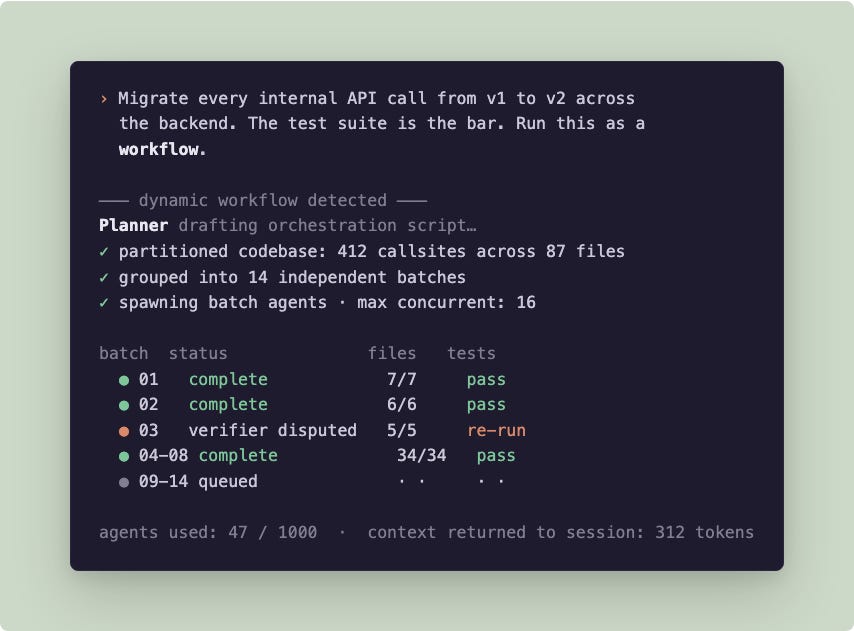
The guardrails are simple. Up to 16 agents run at once, fewer on a machine with few CPU cores. A single run is capped at 1,000 agents total, which exists to stop a runaway loop from spending your month. It runs on every paid plan now, including Pro, where you flip it on in the Dynamic workflows row of /config. It is a research preview, so the details will move.
The example that explains the ceiling
If you want to understand what this feature can really do, look at how Jarred Sumner used it to port Bun, the JavaScript runtime, from Zig to Rust. Roughly 750,000 lines of Rust. 99.8% of the existing test suite passing. Eleven days from first commit to merge.
The interesting part is not the size, it is the shape. He did not run one giant workflow. He chained several. One workflow mapped the correct Rust lifetime for every struct field. A second wrote behavior-identical Rust files in parallel, with two reviewers on each file. A fix loop then drove the build and the test suite to green. After the port landed, an overnight workflow went looking for unnecessary data copies and opened a pull request for each one.
That is the template. The win was not “ask for the whole thing and hope.” It was breaking a massive job into a sequence of workflows, each one partitionable, each one with a hard bar (the lifetime is correct, the file behaves identically, the tests pass), and letting the parallelism do the grinding. Work you would normally plan in quarters finished in days because the tedious middle got fanned out across hundreds of agents instead of done by hand.
My Saturday SaaS was a toy version of the same idea. The reason it worked at all is that “build a working app” decomposes into pieces that can run in parallel: the schema, the auth flow, the payment integration, the landing page, the deploy config. The reason a few decisions were wrong is that “pick a good business idea” is not partitionable and not verifiable, so the workflow had nothing to check itself against on that part. Which is the whole lesson.
How to actually get the most out of it
Here is what I changed between the first Saturday run that produced junk and the later ones that produced something I would keep.
Feel it once with /deep-research before you build your own. The fastest way to understand the rhythm is the workflow Claude Code ships with. Run /deep-research with a real question and it fans web searches across several angles, fetches and cross-checks the sources, votes on each claim, and hands back a cited report with the claims that did not survive cross-checking already filtered out. You watch the phases run in the background and get one report instead of a turn-by-turn transcript. Ten minutes with this teaches you more about what a workflow feels like than any description, including this one.
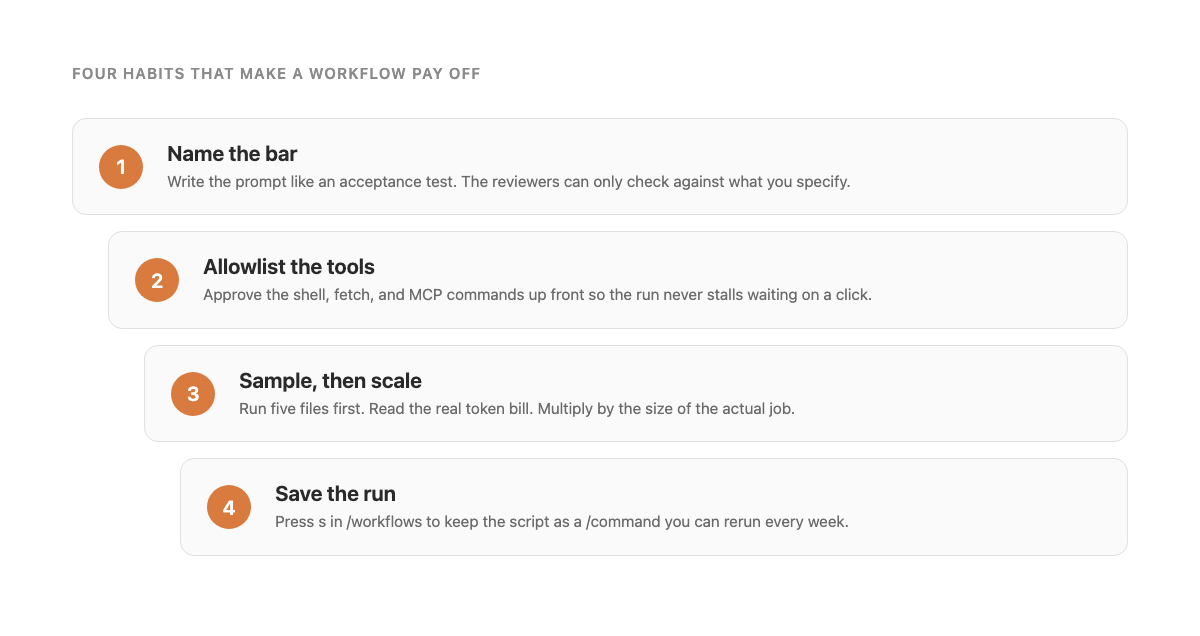
Specify the bar like you mean it. This is the entire skill. A workflow has no human in the loop to correct a vague instruction halfway through, so whatever you wrote at the start is the only quality standard the run has. “Build a SaaS” gives the verifiers nothing to check. “Build a SaaS where a user can sign up, create a subscription in Stripe test mode, cancel it, and the existing tests pass” gives every agent and every reviewer a target. The more your prompt reads like an acceptance test, the better the run. Spend your effort here, not on watching.
Pick your trigger on purpose. There are two ways in, and they are not interchangeable. Putting the word “workflow” in a single prompt runs that one task as a workflow and leaves the rest of your session normal. Running /effort ultracode flips the whole session into a mode where Claude decides for itself when a task deserves a workflow, and a single request can spin off several in a row. Ultracode is the Saturday setting: you want it deciding when to fan out because you are doing a session of big things. The keyword is the weekday setting: you want one specific job run at scale and everything else left alone. Do not leave ultracode on when you go back to routine work, because every small task starts costing like a big one. Drop back with /effort high.
Allowlist the tools before you walk away. This is the unglamorous tip that saves a run. The subagents always run in accept-edits mode, so file writes are automatic, but shell commands, web fetches, and MCP tools that are not on your allowlist will still pause and wait for you to click approve. If you have wandered off, the whole run stalls on a permission prompt. Before a long workflow, add the commands the agents will need to your allowlist. The walk-away only works if nothing is waiting on you.
Scope a sample, read the bill, then scale. Dynamic workflows can burn through meaningfully more tokens than a normal session, and the cost depends entirely on the shape of your task. Do not point it at 500 files first. Point it at five. Watch what the planner partitions, see how often the reviewers dispute a result, and read the actual usage. Then multiply by the size of the real job. That number is your budget, and you got it for the price of a small run instead of a surprise.
Route the cheap stages to a cheaper model. Every agent in a workflow uses your session’s model unless the script sends a stage somewhere else. A lot of the work in a big run is bounded and mechanical, the kind of thing a smaller or faster model handles fine. When you describe the task, tell Claude to use a smaller model for the stages that do not need the strongest one and save the top model for planning and consolidation. Check /model before you start. With Opus 4.8’s fast mode now three times cheaper than before, the partitionable grunt work is exactly where it pays off.
Watch with /workflows, and use the controls. The run is in the background, but you are not blind. Run /workflows, arrow to your run, and press Enter to see every phase with its agent count, token total, and elapsed time. Drill into any agent to read its prompt and what it found. You can pause with p, stop a single misbehaving agent with x, restart one with r. You do not have to babysit, but when a run feels wrong, this is how you find the agent that went sideways before it poisons the rest.
Save the runs that work. When a workflow does what you wanted, press s in the /workflows view and save its script as a command. Now it is a /yourcommand you can run every week. The review you run on every branch, the audit you do every release, the research sweep you do for every issue of a newsletter. The orchestration becomes reusable, which is the part that turns a clever Saturday into a standing part of your toolkit. Saved workflows live in .claude/workflows/ (shared with the repo) or ~/.claude/workflows/ (just for you), and show up in / autocomplete next to the bundled ones.
Stage the runs where you want a checkpoint. A workflow takes no input once it starts. Only an agent’s own permission prompt can pause it. So if you want to sign off between phases, do not try to build one giant workflow with a human gate in the middle, because there is no gate. Run each phase as its own workflow. Bun’s port worked exactly this way: map the lifetimes, then write the files, then drive the tests, then clean up overnight. Four runs, four chances to look before continuing. If a run does get interrupted, you can resume it in the same session, and the agents that already finished return their cached results instead of redoing the work.
What it is genuinely good for
The clean test is two words: partitionable and verifiable.
A task is partitionable when it splits into pieces that can run at the same time without each piece needing the others. A migration across hundreds of files. A bug sweep over a whole service. A security pass checking auth on every endpoint. A research question attacked from several angles at once. A courseware site where each module, each lesson, each quiz is its own buildable unit. These are the jobs where 16 agents at once actually buys you wall-clock time.
A task is verifiable when there is an objective way to know each piece is right. Tests passing is the strongest form. Adversarial reviewers refuting each other is the form built into the feature. If there is no way to check the answer, the review loop has nothing to do and you are just spinning up agents you have to trust on faith.
The Saturday “build something with monetization” experiment sits right at the edge of this. The building is partitionable and the running-or-not is verifiable, so the construction works. The “is this a good idea” part is neither, so that is the part you still have to own. Use the workflow for the build. Keep the judgment for yourself.
Where it falls down
The inverse of the test tells you what to keep out of it. Anything purely sequential, where every step depends on the last, gets nothing from the fan-out and just pays for the overhead. Anything where correctness is a matter of taste gets nothing from the reviewers, because there is no fact for them to converge on. Most writing is in this bucket. So is most product strategy. So is nearly any “should we do X or Y” conversation. For those you still want one Claude in a normal conversation, applying judgment with you, iterating in the loop.
The rough heuristic I have landed on: if a senior engineer would hand this to someone with the words “report back when the tests pass,” it is a workflow. If they would say “let’s sit down and work through this together,” it is not.
The skill this is quietly training
By Sunday the workflow had changed what I spend my attention on. The conversation is no longer where the work happens. It is where you design the work. You spend more time being precise about what done means, because there is no chance to correct vagueness once the run starts. You spend more time choosing the verification bar, because the reviewers are the only quality gate between the agents and you. You spend a lot less time watching a screen, because the screen is not where anything is happening.
That is a genuinely different way to work, and it is harder than learning to prompt well. The skill is specifying a task and a bar precisely enough that you trust the answer without having watched it get made. Dynamic workflows are not the last tool that will reward that skill. They are the first one shipped at this scale, with a real cost ceiling and verification built in. If you have been waiting for the moment when “go build the whole thing and tell me when it is done” became a real instruction instead of a fantasy, this is closer to it than anything before.
So here is the Saturday challenge. Pick one task you have been avoiding because it is too tedious to do by hand and has an objective bar for done. A dependency upgrade. A rename across a hundred files. A courseware site you keep meaning to build. A small SaaS you have been describing to people for a year. Scope a slice, write the bar like an acceptance test, allowlist the tools, and let it run while you do something else. Come back and read what it made.
Then hit reply and tell me what it built. I want to compare the first wave of these, because the tasks people reach for in the first month are going to define what this feature actually becomes.
Until next week,
Marco
Marco Kotrotsos writes Autocomplete, a free newsletter on practical AI for people actually shipping it.
My books on Amazon: Claude Code for Everyone Else and From Vibe to Production.